IQ Option login in Pakistan: how to sign in and open an account
To log in to IQ Option, you need the email or phone number and password on your account, or the Google or Facebook sign-in you used. The same account works on the website, the mobile app and the desktop app. From Pakistan, the website opens through an official mirror, because iqoption.com doesn’t open on Pakistani networks. The login page comes in English and Urdu, and the screenshots on this page are from our own Pakistani account.
Official IQ Option login addresses
Log in only through the official mirrors or the IQ Option apps. If a search shows a site with a similar name, don’t type your password there.
| Platform | Where to find it |
|---|---|
Mirror login page | login.brokeriqoption.com, the page our login button opens. The traderoom runs in the browser, with nothing to install. |
Mirror websites | brokeriqoption.com and brokeriqoption.net |
Main website | iqoption.com and login.iqoption.com, which don’t open on Pakistani networks |
Android | Google Play or the official APK (51.3 MB), Android 8.1 or newer |
iPhone | App Store, iOS 15 or newer |
Computer | Windows (.msi) and macOS (.dmg) apps, covered in our download guide |
Not IQ Option | iqoptions.net and iq-option.com, so never type your password there |
The same login details work everywhere, so a trade you open on your phone also shows on your computer. Our download guide explains where to get each app safely. For ratings, fees and company details, read our IQ Option Pakistan review.
How to log in
From the website
- Open login.brokeriqoption.com, or press the login button at the top of this page.
- If you prefer Urdu, choose it from the language menu on the login card.
- Enter the email or phone number you signed up with, then your password. If you signed up with Google or Facebook, press that button instead.
- If 2-step authentication is on, enter the code. The traderoom then opens.
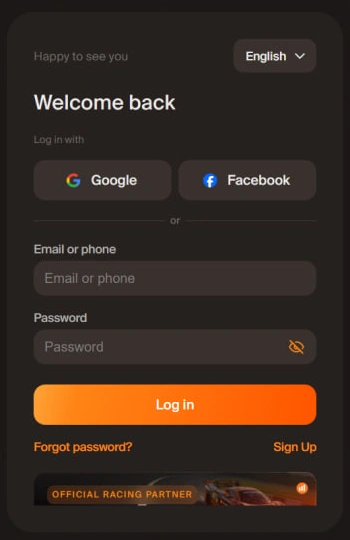
From the mobile and desktop apps
Install the app from Google Play, the App Store, the official APK or the Windows and macOS installers. The first time you open it, the login form appears, and you enter the same email or phone number and password.
If you trade in a browser, keep only one tab open. Under IQ Option’s rules, trades made with the traderoom open in several tabs can be corrected or cancelled.
How to open a new account
- Press “Sign Up” on the login card, or use the button below.
- Choose Pakistan as your country of residence.
- Enter your email and a password, or sign up with Google or Facebook, and press “Create an account”.
A new account gets a demo with a $10,000 virtual balance straight away, so you can try the platform without a deposit. You must be 18 or older, and each person can hold one account. If IQ Option finds several accounts, it can block them and cancel their trades.
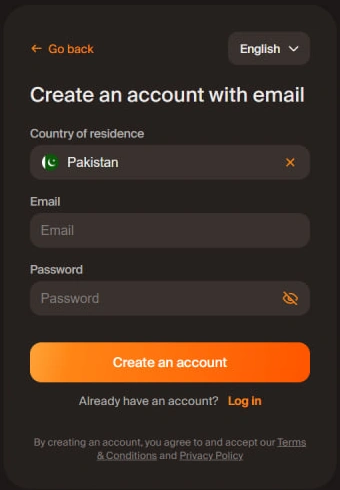
Account verification
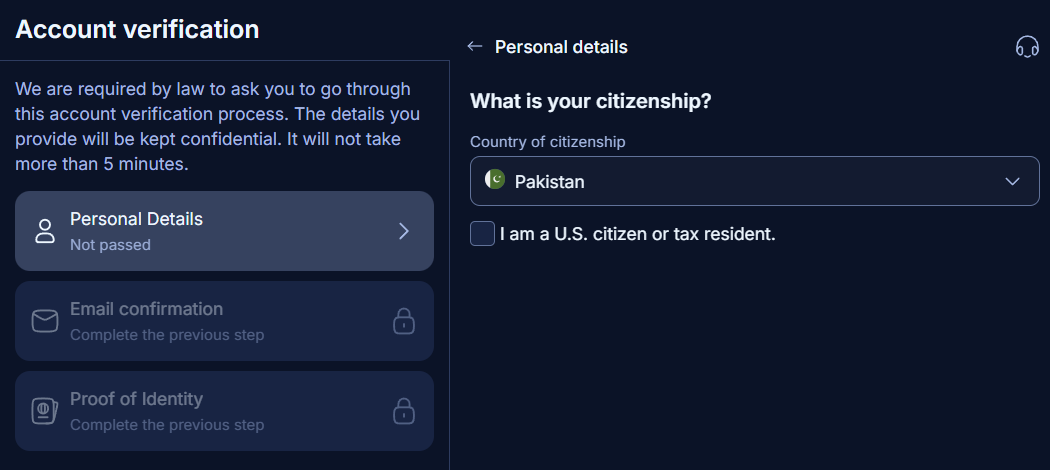
You have to verify your account before your first withdrawal. Logging in, demo trading and deposits all work without it. The “Account verification” page in the traderoom has three steps:
- Personal details: your legal name exactly as it appears on your ID, then your date of birth and citizenship.
- Email confirmation: enter the 6-digit code sent to your email. You can do this step later.
- Proof of identity: a photo check run by Jumio with a valid government-issued document, so keep your CNIC or passport ready. If your laptop has no camera, the “Use mobile phone” option moves the check to your phone.
The platform says the process takes no more than 5 minutes. Later on, IQ Option may also ask for proof of address, such as a utility bill, or other documents.
If you can't log in
| Problem | What to do |
|---|---|
The page doesn’t load | iqoption.com doesn’t open on Pakistani networks. Use login.brokeriqoption.com or the app. |
Email or password doesn’t match | Check the spelling of your email and Caps Lock. If you signed up with Google or Facebook, use that button. Otherwise reset the password. |
Reset email doesn’t arrive | Check your spam folder and make sure you entered the email on the account |
2-step code doesn’t arrive | Ask for a new code after a few minutes, or use another 2-step method if you set one up. If it still fails, write to support. |
You changed your phone number | SMS codes go to the number on the account. Ask support to change it. |
The app won’t open or freezes | Update the app, and log in from the browser in the meantime |
The account shows as closed | A temporarily closed account can be reopened through support |
A VPN is on | Turn off the VPN or VPS and use the mirror instead. IQ Option’s terms say accounts used through a VPN can be closed. |
If you forget or want to change your password
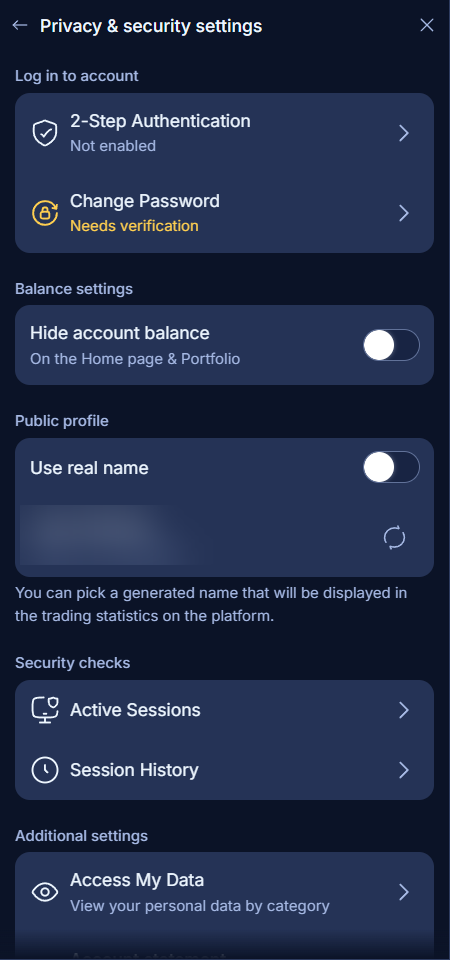
If you can’t remember your password, press “Forgot password?” on the login page, enter the email or phone number on your account and press “Continue”. Then follow the instructions IQ Option sends you. While logged in, you can change the password in “Privacy & security settings”, but that option asks you to verify the account first. Pick a new password you don’t use on any other site.
2-step authentication and active sessions
All the security options are in “Privacy & security settings”:
- 2-step authentication asks for an extra code after your password. It’s off on a new account, so switch it on yourself. Codes come by email, SMS or push notification, and push only works once your email or phone is verified.
- “Active Sessions” shows the devices logged in to your account right now, and “Session History” lists earlier logins.
- “Hide account balance” keeps your balance out of sight on the Home page and in Portfolio.
- In the public profile, you can show a generated name instead of your real name in the platform’s trading statistics.
If you spot a session you don’t recognise, change your password straight away and turn on 2-step authentication.
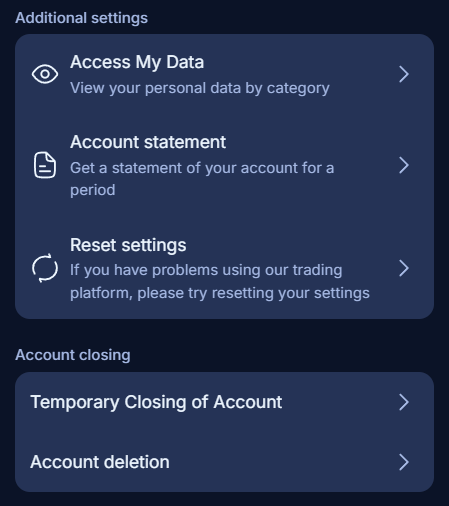
Closing or deleting your account
Two options sit under “Account closing” at the bottom of the same settings page:
- “Temporary Closing of Account” stops logins and transactions. You can reopen the account later by contacting support.
- “Account deletion” removes the account and your personal data for good, and it can’t be undone. Before that, close all open positions and pending orders and withdraw your balance.
Contacting support
After you log in, the “Support 24/7” button in the bottom left corner of the traderoom opens a chat that runs day and night. If you can’t log in at all, write to support@iqoption.com from the email on your account.
FAQ
How do I log in to IQ Option from Pakistan?
Open login.brokeriqoption.com or the IQ Option app and enter your email or phone number and password. If 2-step authentication is on, enter the code as well.
Why doesn't iqoption.com open in Pakistan?
iqoption.com doesn’t open on Pakistani networks. The mirrors brokeriqoption.com, brokeriqoption.net and login.brokeriqoption.com open the same account, and so do the official apps.
Is login.brokeriqoption.com safe?
Yes. It’s an official IQ Option mirror, and it logs you in to your normal IQ Option account. Sites like iqoptions.net or iq-option.com are not IQ Option addresses, so never enter your password there.
I can't log in. What should I do?
Check the spelling of your email and your password, or reset the password. Turn off any VPN and use the mirror instead. If that doesn’t help, write to the 24/7 chat or to support@iqoption.com.
What if I forget my password?
Press Forgot password? on the login page, enter the email or phone number on your account and follow the instructions IQ Option sends you.
Can I use the same account on my phone and computer?
Yes. The same login works on the website and in the Android, iPhone, Windows and macOS apps. You can see which devices are logged in under “Active Sessions” in “Privacy & security settings”.
Can I trade without verifying my account?
Yes. Logging in, the demo, deposits and trading all work without verification. You have to finish it before your first withdrawal.
Can I open more than one account?
No. Each person can hold one account. If IQ Option finds several, it can block them and cancel their trades.
Can a temporarily closed account be reopened?
Yes. While it’s closed you can’t log in or make transactions, but support can reopen it.
How do I delete my IQ Option account?
Choose “Account deletion” at the bottom of “Privacy & security settings”. Close all open positions and pending orders and withdraw your balance first, because a deleted account can’t be restored.
Risk warning
IQ Option’s financial instruments carry a high level of risk, and you can lose the money you invest. Trading CFDs and options carries a high risk of losing money, so make sure you understand how CFDs work before you invest. IQ Option is not registered with SECP or any other regulator in Pakistan. This page is an independent review, not financial advice. The author may earn a commission through affiliate links.